.png)
VR and AR in Architecture, Engineering and Construction: 3 Use Cases, From Design to Site


Key takeaways
A building project moves through three stages: design, coordination and construction. VR and AR have a use case in each one.
Presentations and design reviews: the model lives in SketchUp, Rhino or Revit, while materials and lighting live in Enscape, Twinmotion or Lumion. Presentation needs a tool that takes both.
BIM coordination: workflows differ from team to team, and all of them end in large files. Toning down visual quality to manage size is not an acceptable answer.
On-site verification: QR-code workflows on handheld devices are reliable but fall short on immersion. Lighter glasses point to hands-free site walks.
SENTIO VR is built for all three on one platform, on a standalone Meta Quest headset or web browsers.
Overview
Buildings are designed in drawings and on screens, but they are experienced at full scale. That gap is why visualization matters in AEC. Reviewing a design at 1:1 scale, standing inside it, catches what a plan or a render cannot. The technology for doing this keeps changing. Headsets get lighter, new devices arrive every year, and the software around them moves just as fast. It is hard for a project team to know where VR and AR fit today, let alone next year.
In this post we set out the broad context: how the different workflows and stages of a project can benefit from VR and AR.

A typical building project moves through three stages.
1) Design. Architects and designers develop the concept and the design in tools like SketchUp, Rhino and Revit, or in open formats like FBX and GLB.
2) Coordination. In preconstruction, the architectural, structural and MEP models come together as large Revit, Navisworks and IFC files, federated into one coordinated model.
3) Construction. The model has to meet the real building on site, and that is where AR comes in.
XR can improve every one of these stages. But the people who buy software for these teams are overwhelmed by trialling new tools and training their teams on each one. We believe an XR platform should cover the whole project lifecycle, instead of sitting in a silo as a point tool for a single use case. Here are the three use cases, one by one.
1. Presentations and design reviews
Most clients cannot read a plan or a section. Put them inside the design at 1:1 scale and they understand it in seconds.
We hear this on discovery calls, in our customers' own words. An architect working on residential projects told us a walkthrough is "going to give the client a better experience than what a 3D model could give them." A project team reviewing equipment layouts put the problem more simply: on a screen, "what is 10 metres, what is 15?" And a retail design lead described the bar for showing a design to executives: "I need to be able to put someone in a headset with very little friction, put it on, and just walk."
The difficulty is that a design does not sit in one place. The model lives in SketchUp, Rhino or Revit. The materials, lighting and setting that make it convincing live in a renderer like Enscape, Twinmotion or Lumion. Getting both in front of a client usually means yet another tool to learn. The same design lead again: "I don't have the time to figure out a new software."
So presentation needs a broader tool: one that takes the model from any of these design tools and the rendered views from any of these renderers, and puts both in the same headset at 1:1 scale.
Reviewing at 1:1 scale with clients early in the design phase:
brings feedback forward, while changes are still cheap
shapes the design before it hardens
cuts approval time
keeps everyone aligned on what is being built

2. BIM coordination
Once the engineering models come together, the review changes. Now it is every stakeholder and several engineering design teams walking the combined model at 1:1 scale to find and log issues before they reach site. This is critical work, and here we are in the world of Navisworks, IFC and large coordinated models. The workflows differ from team to team:
Some federate in Navisworks and send issues to Autodesk Forma, or to a separate issue management tool such as Revizto.
Some are starting to treat coordination as part of the Autodesk Construction Cloud and Forma ecosystem.
Some keep it traditional and review a set of linked Revit files.
An XR platform has to bring in all of these workflows. And whichever one a team follows, the result tends to be a large file.We hear the pain on discovery calls. A client-side development team had trialled an XR tool for design reviews and told us the main gap was "the model complexity" and the size of their models. A 1.8 GB federated model had been "not ideal". A manager at a large general contractor had tried two XR coordination tools and was using neither. His verdict: "a bit difficult."
The files are the other half of the problem. A BIM coordinator on data-centre projects described Navisworks models running in to a few gigabutes. A contractor's VR lead spoke of dozens or hundreds of files per project that have to be selected and combined. And a team laying out factory equipment, with 3 to 4 GB models detailed down to nuts and bolts, told us nothing on the market works for them.
Size is the hard part. What stops a model from opening on a standalone headset is the amount of geometry in it, not the file format. A federated Navisworks model is the usual case, but a SketchUp masterplan or a detailed IFC hits the same ceiling.
Toning down the quality of the model just to manage its size is not an acceptable answer either. These models are reviewed by stakeholders. If the software loads the model without keeping the visual fidelity reasonable, they find the experience cartoonish.
3. On-site verification in AR
Once construction starts, the question changes from "what are we building?" to "was it built as designed?" That is on-site verification: the QA/QC of installed work against the model.
Traditionally this has been done on handheld devices, with the model placed on site using QR codes. It is a stable, reliable workflow. But it falls short on immersion, because you look at the building through a tablet, and it takes a lot of preparation before anyone walks the site.
Teams tell us where it hurts. A manager at a large general contractor summed up their QR-marker workflow as "scan, remove, paint's on it, doesn't work." Others say aligning the model on site is tedious and has to be redone every session, and that they want a lighter headset before taking AR onto a live site.
There is also evidence that it already works on a Meta Quest. About ten of our customers use AR on site today, on walks of around 20 minutes with the model staying locked in place. A retail design lead used pass-through to walk senior vice presidents through a store design at 1:1 in an open warehouse and told us "it was a great experience." And when we asked a client-side development team whether overlaying the BIM model and walking the site would help delivery, the answer was "100%."
The upcoming glasses ecosystem could change that. Devices such as Xreal's Aura and Meta's glasses point to hands-free experiences on site, on hardware powerful enough to load a full BIM model. That would make site visits seamless, even for large models.

How the three run on Sentio
Most XR tools in AEC were built for one of these three use cases. Sentio VR is built for all three on one platform, from any modelling tool, on a standalone Meta Quest headset. A model is uploaded once in the browser and opened in the headset with a 6-digit code, so there is one upload, one account and one tool for the team to learn.
Use case | What goes in | What you do with it on Sentio | Tools built for this use case |
Presentations and design reviews | SketchUp, Rhino and Revit models, FBX and GLB files, and 360° panoramas from Enscape, Twinmotion and Lumion | Walk clients through at 1:1 scale, or send a browser link to anyone without a headset | Arkio, Enscape, Twinmotion |
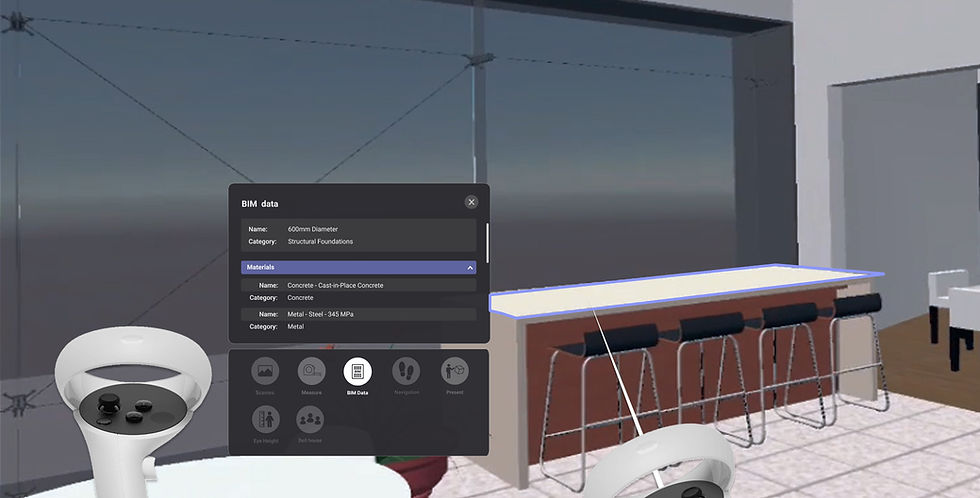
BIM coordination | Navisworks, IFC and Revit models, including direct import from Autodesk Construction Cloud and Forma | Review together in multi-user meetings, with BIM data, layers and measurement. Log issues and export them as BCF or PDF | Resolve, Autodesk Workshop XR |
On-site verification | The same model, switched to AR on a Meta Quest 3 | Overlay it on the real space at 1:1, align it and lock it in place | GAMMA AR, Sitelink |
Conclusion: one layer for all your XR needs
Most firms do not rely on just one or two file formats or workflows. For them, choosing a VR/AR tool can be very difficult. It helps to map your use cases and workflows against what each solution covers.
Adopting more software, and training a team on each new tool, keeps getting harder as the work gets more complex. We are building for a future where you do not need point tools, or a different tool for every job. We envision a single layer for all your XR needs, from the early conceptual phase to final delivery.
If you would like to learn more, or to try this on your own project, book a time with us.

Common questions
Which file formats does Sentio VR support? Revit, SketchUp, Rhino, Navisworks and IFC for 3D walkthroughs, plus direct import from Autodesk Construction Cloud and Forma. 360° tours take panoramas from Enscape, Lumion, D5, Twinmotion and V-Ray, and photos from 360° cameras.
Do I need a powerful PC to use VR with BIM models? No. Sentio runs on standalone Meta Quest headsets. Models are processed in the cloud and opened on the headset with a code.
Can I view large Revit, Navisworks, IFC or SketchUp models in VR? Yes. Large design files are processed in minutes and run on a standalone Meta Quest headset. Book a call with us to get early access to our solution for large models.
Does Sentio VR support AR on a construction site? Yes. On Meta Quest 3 you can overlay the model on the real space at 1:1 scale, align it and lock it in place. Projects downloaded in advance work offline.
Is multi-user collaboration with issues possible? Yes. Real-time collaboration is available, with the ability to view BIM data, create issues and generate PDF and BCF reports.
Is Sentio VR only for presentations? No. Teams use the same platform for client presentations, model reviews with BIM data and issues, and AR walks on site.


